
Agent,
The Division Resurgence is now available to play for free on PC via Ubisoft Connect.
You can download it now and play using your existing Ubisoft Connect account or by creating a new account.
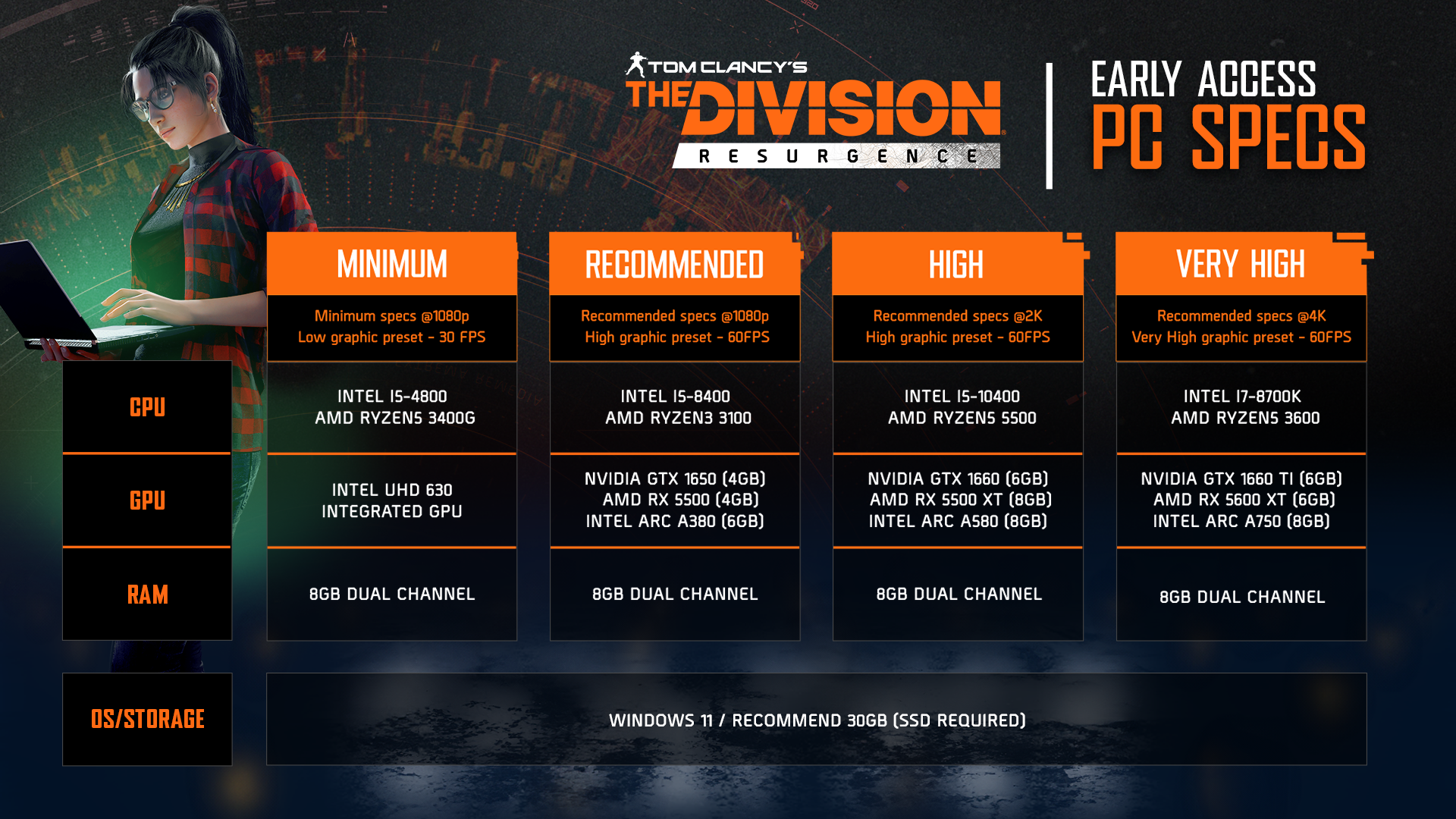
WHAT PC SPECIFICATIONS ARE SUGGESTED TO PLAY THE DIVISION RESURGENCE?
Here are the full recommended specifications to play The Division Resurgence on your PC.
FULLY CROSS-PLAY
The Division Resurgence is fully cross-play on PC and mobile (iOS and Android).
This means that, using the same Ubisoft Connect account, you can continue your progression in the game from any device.
You can also play with your friends on any device, as long as you are in the same regional server.
HOW DO I CONTINUE MY PROGRESSION FROM MOBILE?
You can continue playing on the same account from whichever device you choose, enjoying the game with your friends on whatever device they may be playing from.
Make sure to connect or link your guest account with Ubisoft Connect to enjoy a seamless shared progression whether you are playing on PC or mobile. Everything you earn on one platform carries over to the other, allowing you to switch devices at any time.
If you are already playing on a mobile device as a guest, make sure your progression is saved by logging into a Ubisoft Connect account before connecting on the PC version.
HOW DO I DOWNLOAD THE GAME?
Simply log into the Ubisoft Connect launcher on your computer, search for The Division Resurgence in the Ubisoft games store and download it to your computer.
The game will first download a launcher that will prompt you to continue downloading the game files.
HOW MUCH STORAGE DO I NEED?
The Division Resurgence PC version is around 17GB, and we recommend you have at least 30GB available on your computer to ensure smooth running.
CAN I PLAY WITH MOUSE AND KEYBOARD? A CONTROLLER?
Once the game is downloaded onto your computer, you can use your usual inputs to enjoy the game: either mouse and keyboard or a controller of your choice.
I HAVE AN ISSUE WITH THE GAME ON PC, HOW DO I REQUEST HELP?
If you encounter an issue, a bug or have a question about the game, you can reach out to Player Support at any moment by clicking on the support icon in the game. This enables our team to be made aware of your query while collecting all the relevant game and account information we need to quickly find an answer.
I HAVE AN ISSUE WITH THE GAME ON PC, HOW DO I REQUEST HELP?
If you encounter an issue, a bug or have a question about the game, you can reach out to Player Support at any moment by clicking on the support icon in the game. This enables our team to be made aware of your query while collecting all the relevant game and account information we need to quickly find an answer.
I PLAY ON MOBILE, HOW DO I LOG INTO A UBISOFT CONNECT ACCOUNT ON PC?
If you play on mobile using a Ubisoft Connect account, simply log back into the same account on PC to continue your progression on that account where you left off on mobile.
If you have already started playing on mobile with a Guest account, make sure to click “Link to Ubisoft Connect” in the options before logging into an existing Ubisoft Connect account on another device (mobile or PC). Once this is done, you can continue your progress on any device using that same Ubisoft Connect account.
If you created a Ubisoft Connect account using the Google or Apple ID account creation flow, and are not sure of your credentials (password), go to the main Ubisoft website (https://www.ubisoft.com/) and follow the steps under "I have trouble logging in" to retrieve or change your password attached to the email address of your Google account, AppleID (or other).